Command line:
modinfo bonding
Output:
filename: /lib/modules/2.6.32-400.36.4.el5uek/kernel/drivers/net/bonding/bonding.ko
author: Thomas Davis, tadavis@lbl.gov and many others
description: Ethernet Channel Bonding Driver, v3.6.0
version: 3.6.0
license: GPL
srcversion: 765520422A582FCDBFBC802
depends: ipv6
vermagic: 2.6.32-400.36.4.el5uek SMP mod_unload modversions
parm: max_bonds:Max number of bonded devices (int)
parm: tx_queues:Max number of transmit queues (default = 16) (int)
parm: num_grat_arp:Number of gratuitous ARP packets to send on failover event (int)
parm: num_unsol_na:Number of unsolicited IPv6 Neighbor Advertisements packets to send on failover event (int)
parm: miimon:Link check interval in milliseconds (int)
parm: updelay:Delay before considering link up, in milliseconds (int)
parm: downdelay:Delay before considering link down, in milliseconds (int)
parm: use_carrier:Use netif_carrier_ok (vs MII ioctls) in miimon; 0 for off, 1 for on (default) (int)
parm: mode:Mode of operation : 0 for balance-rr, 1 for active-backup, 2 for balance-xor, 3 for broadcast, 4 for 802.3ad, 5 for balance-tlb, 6 for balance-alb (charp)
parm: primary:Primary network device to use (charp)
parm: primary_reselect:Reselect primary slave once it comes up; 0 for always (default), 1 for only if speed of primary is better, 2 for only on active slave failure (charp)
parm: lacp_rate:LACPDU tx rate to request from 802.3ad partner (slow/fast) (charp)
parm: ad_select:803.ad aggregation selection logic: stable (0, default), bandwidth (1), count (2) (charp)
parm: xmit_hash_policy:XOR hashing method: 0 for layer 2 (default), 1 for layer 3+4 (charp)
parm: arp_interval:arp interval in milliseconds (int)
parm: arp_ip_target:arp targets in n.n.n.n form (array of charp)
parm: arp_validate:validate src/dst of ARP probes: none (default), active, backup or all (charp)
parm: fail_over_mac:For active-backup, do not set all slaves to the same MAC. none (default), active or follow (charp)
parm: all_slaves_active:Keep all frames received on an interfaceby setting active flag for all slaves. 0 for never (default), 1 for always. (int)
parm: resend_igmp:Number of IGMP membership reports to send on link failure (int)
Nov 19, 2014

Failed to get connection to session: Failed to connect to socket /tmp/dbus: Connection refused (virt-manager)
Problem:
virt-manager cannot be started after fresh install due to a bug on dbus.
Fix, recreate machine id:
dbus-uuidgen > /var/lib/dbus/machine-id
Ref:
http://bugs.centos.org/view.php?id=5334
https://bugzilla.redhat.com/show_bug.cgi?id=598200
http://nutanix.blogspot.com/2013/06/kvm-virt-manager-startup-failure.html
virt-manager cannot be started after fresh install due to a bug on dbus.
Fix, recreate machine id:
dbus-uuidgen > /var/lib/dbus/machine-id
Ref:
http://bugs.centos.org/view.php?id=5334
https://bugzilla.redhat.com/show_bug.cgi?id=598200
http://nutanix.blogspot.com/2013/06/kvm-virt-manager-startup-failure.html
Nov 18, 2014
Interactive on RHEL / Centos 7 (grub2)
Edit boot entry
At boot menu, press "e" to edit a boot entry, go to the line beginning with "linux".
Add "systemd.confirm_spawn=1", remove "rhgb quiet"
linux16 /vmlinuz-3.10.0-123.9.3.el7.x86_64 root=/dev/mapper/ol-root ro crashkernel=auto vconsole.font=latarcyrheb-sun16 rd.lvm.lv=ol/swap rd.lvm.lv=ol/root vconsole.keymap=usrhgb quiet LANG=en_US.UTF-8 systemd.confirm_spawn=1
Continue to boot up linux
Press ctrl-x to continue the boot process. The system will now ask interactively which services are to be started.
At boot menu, press "e" to edit a boot entry, go to the line beginning with "linux".
Add "systemd.confirm_spawn=1", remove "rhgb quiet"
linux16 /vmlinuz-3.10.0-123.9.3.el7.x86_64 root=/dev/mapper/ol-root ro crashkernel=auto vconsole.font=latarcyrheb-sun16 rd.lvm.lv=ol/swap rd.lvm.lv=ol/root vconsole.keymap=us
Continue to boot up linux
Press ctrl-x to continue the boot process. The system will now ask interactively which services are to be started.
Create, list, and extract archives under Linux (tar, star, gzip, bzip2)
Create Archive:
tar -cvf tmp.tar tmp
star -c -f=tmp.star tmp
Create Archive, and with compression:
tar -cvf - tmp | gzip > tmp.tar.gz
star -c tmp | bzip2 > tmp.star.bz2
List Archive:
star -t -f=tmp.star
tar -tvf tmp.tar
List Archive, and with compression:
gzip -cd tmp.star.gz | star -t
bzip2 -cd tmp.tar.bz2 | tar -tvf -
Extract Archive:
tar -xvf tmp.tar
star -x -f=tmp.star
Extract Archive, and with compression:
gzip -cd tmp.tar.gz | tar -xvf -
bzip2 -cd tmp.star.bz2 | star -x
tar -cvf tmp.tar tmp
star -c -f=tmp.star tmp
Create Archive, and with compression:
tar -cvf - tmp | gzip > tmp.tar.gz
star -c tmp | bzip2 > tmp.star.bz2
List Archive:
star -t -f=tmp.star
tar -tvf tmp.tar
List Archive, and with compression:
gzip -cd tmp.star.gz | star -t
bzip2 -cd tmp.tar.bz2 | tar -tvf -
Extract Archive:
tar -xvf tmp.tar
star -x -f=tmp.star
Extract Archive, and with compression:
gzip -cd tmp.tar.gz | tar -xvf -
bzip2 -cd tmp.star.bz2 | star -x
Nov 14, 2014
GitHub: setup new account, create repo, sync from linux
Create an account on GitHub
https://github.com/join
Add an SSH key
https://help.github.com/articles/generating-ssh-keys/
Create new repo
https://help.github.com/articles/create-a-repo/
Install git client on linux
yum -y install git-core
Setup username and email
git config --global user.name 'biggie'
git config --global user.email 'void@space.null'
Clone the new repo
git clone git@github.com:biggie/juicy.git /tmp/juicy
Add modified files
(some changes)
git add .
Commit changes to local repo
git commit -m 'Tell me what happened'
Push changes back to GitHub
git push
Verify change logs
git log
https://github.com/join
Add an SSH key
https://help.github.com/articles/generating-ssh-keys/
Create new repo
https://help.github.com/articles/create-a-repo/
Install git client on linux
yum -y install git-core
Setup username and email
git config --global user.name 'biggie'
git config --global user.email 'void@space.null'
Clone the new repo
git clone git@github.com:biggie/juicy.git /tmp/juicy
Add modified files
(some changes)
git add .
Commit changes to local repo
git commit -m 'Tell me what happened'
Push changes back to GitHub
git push
Verify change logs
git log
Nov 13, 2014
Grub: Windows multi boot, mutually exclusive partitions
Suppose we have this filesystem layout:
(hd0,0) - Centos 6
(hd0,1) - Windows Server 2003
(hd0,2) - Windows Server 2003
(hd0,3) - Windows Server 2012
In /etc/grub.conf, insert or update the following boot entries for windows (centos is already present):
title windows 2003 (hd0,1)
unhide (hd0,1)
hide (hd0,2)
hide (hd0,3)
rootnoverify (hd0,1)
chainloader +1
makeactive
title windows 2008 (hd0,2)
hide (hd0,1)
unhide (hd0,2)
hide (hd0,3)
rootnoverify (hd0,2)
chainloader +1
makeactive
title windows 2012 (hd0,3)
hide (hd0,1)
hide (hd0,2)
unhide (hd0,3)
rootnoverify (hd0,3)
chainloader +1
makeactive
When any one windows boots up, all other windows partitions will be hidden, and therefore be protected from any unwanted modifications.
(hd0,0) - Centos 6
(hd0,1) - Windows Server 2003
(hd0,2) - Windows Server 2003
(hd0,3) - Windows Server 2012
In /etc/grub.conf, insert or update the following boot entries for windows (centos is already present):
title windows 2003 (hd0,1)
unhide (hd0,1)
hide (hd0,2)
hide (hd0,3)
rootnoverify (hd0,1)
chainloader +1
makeactive
title windows 2008 (hd0,2)
hide (hd0,1)
unhide (hd0,2)
hide (hd0,3)
rootnoverify (hd0,2)
chainloader +1
makeactive
title windows 2012 (hd0,3)
hide (hd0,1)
hide (hd0,2)
unhide (hd0,3)
rootnoverify (hd0,3)
chainloader +1
makeactive
When any one windows boots up, all other windows partitions will be hidden, and therefore be protected from any unwanted modifications.
Nov 11, 2014
Puppet Module: adding cron jobs, software packages, services
Node configuration (Default, and Individual node)
# site.pp
Package {
allow_virtual => true,
}
# Install update job and ntp to all nodes
node default {
include apps::update
include apps::ntp
}
# Install tomcat6 and httpd to tomcat1.lan
node 'tomcat1.lan' {
include apps::ntp
include apps::update
include apps::tomcat6
include apps::httpd
}
Module and Class Configuration
# apps/init.pp
# Cron jobs for OS and puppet update.
class apps::update {
cron { yum-update:
command => "/usr/bin/yum -y update",
user => root,
minute => "*/5"
}
cron { puppet-update:
command => "/usr/bin/puppet agent --test",
user => root,
minute => "*/5"
}
}
# Auto install, and auto start-up
class apps::ntp {
package { 'ntp': ensure => installed }
service { "ntpd":
ensure => running,
enable => true,
subscribe => Package["ntp"]
}
}
class apps::httpd {
package { 'httpd': ensure => installed }
service { "httpd":
ensure => running,
enable => true,
pattern => "httpd",
subscribe => Package["httpd"]
}
}
# Same as above, resolved package dependencies.
class apps::tomcat6 {
package { 'tomcat6': ensure => installed }
package { 'glibc-headers': ensure => installed }
package { 'kernel-headers': ensure => installed }
Package['kernel-headers'] -> Package['glibc-headers'] -> Package['tomcat6']
service { "tomcat6":
ensure => running,
enable => true,
pattern => "tomcat6",
subscribe => Package["tomcat6"]
}
}
# site.pp
Package {
allow_virtual => true,
}
# Install update job and ntp to all nodes
node default {
include apps::update
include apps::ntp
}
# Install tomcat6 and httpd to tomcat1.lan
node 'tomcat1.lan' {
include apps::ntp
include apps::update
include apps::tomcat6
include apps::httpd
}
Module and Class Configuration
# apps/init.pp
# Cron jobs for OS and puppet update.
class apps::update {
cron { yum-update:
command => "/usr/bin/yum -y update",
user => root,
minute => "*/5"
}
cron { puppet-update:
command => "/usr/bin/puppet agent --test",
user => root,
minute => "*/5"
}
}
# Auto install, and auto start-up
class apps::ntp {
package { 'ntp': ensure => installed }
service { "ntpd":
ensure => running,
enable => true,
subscribe => Package["ntp"]
}
}
class apps::httpd {
package { 'httpd': ensure => installed }
service { "httpd":
ensure => running,
enable => true,
pattern => "httpd",
subscribe => Package["httpd"]
}
}
# Same as above, resolved package dependencies.
class apps::tomcat6 {
package { 'tomcat6': ensure => installed }
package { 'glibc-headers': ensure => installed }
package { 'kernel-headers': ensure => installed }
Package['kernel-headers'] -> Package['glibc-headers'] -> Package['tomcat6']
service { "tomcat6":
ensure => running,
enable => true,
pattern => "tomcat6",
subscribe => Package["tomcat6"]
}
}
Nov 10, 2014
Install puppet on centos linux 6
Install puppet yum repo
rpm -ivh https://yum.puppetlabs.com/el/6.5/products/x86_64/puppetlabs-release-6-10.noarch.rpm
rpm -ivh https://yum.puppetlabs.com/el/7/products/x86_64/puppetlabs-release-7-10.noarch.rpm
Install Puppet Client
yum -y install puppet
chkconfig puppet on
service puppet restart
Install Puppet Master
yum -y install puppet-server
chkconfig puppetmaster on
service puppetmaster restart
Setup Firewall Exception
iptables -I INPUT 4 -m state --state NEW -m tcp -p tcp --dport 8140 -j ACCEPT
service iptables save
service iptables restart
Request a New Certificate (on Client)
puppet agent --ca_server puppet1.lan
Sign the Certificate Request (on Server)
puppet ca sign tomcat1.lan
Setup Puppet Master Location (on Client)
echo "server = puppet1.lan" >> /etc/puppet/puppet.conf
service puppet restart
Install First Manifest (on Server)
cat << EOF > /etc/puppet/manifests/site.pp
# site.pp
cron { yum-update:
command => "/usr/bin/yum -y update",
user => root,
minute => "*/1"
}
EOF
Validate Syntax of Manifest (on Server)
puppet parser validate /etc/puppet/manifests/site.pp
Pull, and Apply Manifest (on Client)
puppet agent --verbose –test
rpm -ivh https://yum.puppetlabs.com/el/6.5/products/x86_64/puppetlabs-release-6-10.noarch.rpm
rpm -ivh https://yum.puppetlabs.com/el/7/products/x86_64/puppetlabs-release-7-10.noarch.rpm
Install Puppet Client
yum -y install puppet
chkconfig puppet on
service puppet restart
Install Puppet Master
yum -y install puppet-server
chkconfig puppetmaster on
service puppetmaster restart
Setup Firewall Exception
iptables -I INPUT 4 -m state --state NEW -m tcp -p tcp --dport 8140 -j ACCEPT
service iptables save
service iptables restart
Request a New Certificate (on Client)
puppet agent --ca_server puppet1.lan
Sign the Certificate Request (on Server)
puppet ca sign tomcat1.lan
Setup Puppet Master Location (on Client)
echo "server = puppet1.lan" >> /etc/puppet/puppet.conf
service puppet restart
Install First Manifest (on Server)
cat << EOF > /etc/puppet/manifests/site.pp
# site.pp
cron { yum-update:
command => "/usr/bin/yum -y update",
user => root,
minute => "*/1"
}
EOF
Validate Syntax of Manifest (on Server)
puppet parser validate /etc/puppet/manifests/site.pp
Pull, and Apply Manifest (on Client)
puppet agent --verbose –test
Nov 4, 2014
Trigger an alert from windows eventlog, with event text as message
Step-1: Create a Job which will trigger on an Event during specific condition

Step-2: Right Click on the job and Export it, save it as test.xml

Step-3: Open test.xml File in notepad to Edit, Find (Event Trigger)

Step-4: Include ValueQueries as shown below, save the file. In below
example, I have added (Event/EventData/Data) as (EventData) which will
be used as $EventData while sending a mail.

Tip:
You can include any values in the event (Example: Event/System/Computer
will include your Server Name). You can open the event -> Go to
Details Tab -> Select XML view to see more details:

Step-5:
Delete the existing task and import the new task using modified XML file.

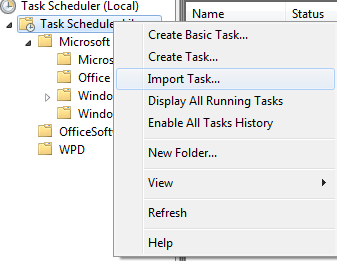
Step-6:
Edit Actions -> Send an e-mail option, include $(EventData) as appropriate


May 15, 2008
好老師捨身救活四學生
【本報訊】在大地震中,無數的學校被無情的震倒,而一個個老師犧牲了性命救活學生的偉大故事,卻成了今次悲劇中的禮讚。
在德陽市漢旺鎮一間學校任職教導主任的譚千秋老師(50歲),在前日(周二)晚上10時許,救援人員從倒塌校舍的瓦礫中將他的屍體挖掘出來。救援人員說:「我們發現他的時候,他雙臂張開趴在課桌上,身體死死地護着四名學生,四名學生都活下來了。」其中一名獲救高中二女生劉紅麗的舅舅事後說:「他可是個大好人,大英雄呀!」譚老師的妻子撫着丈夫的屍體,替他拭去臉上每一粒沙塵,為他整理蓬亂的頭髮,譚老師的後腦被石頭壓得深凹下去……譚妻哭不成聲:「那天早上他和平常一樣,6點就起來,給我們小女兒洗漱穿戴好,帶着她出去散步,然後早早上班,這一走就再也沒回來了。」
用背擋住水泥板
遵道鎮歡歡幼稚園在地震中完全倒塌,當時有80多名孩子午睡,事件中共有50多名小孩和3名老師死亡,瞿萬容老師是其中一名死者,當時她用背部擋住垮塌的水泥板,懷裏還緊抱着一名小孩。幼稚園校長李娟哭說:「小孩獲救了,但瞿老師就永遠離開了我們。」
在德陽市漢旺鎮一間學校任職教導主任的譚千秋老師(50歲),在前日(周二)晚上10時許,救援人員從倒塌校舍的瓦礫中將他的屍體挖掘出來。救援人員說:「我們發現他的時候,他雙臂張開趴在課桌上,身體死死地護着四名學生,四名學生都活下來了。」其中一名獲救高中二女生劉紅麗的舅舅事後說:「他可是個大好人,大英雄呀!」譚老師的妻子撫着丈夫的屍體,替他拭去臉上每一粒沙塵,為他整理蓬亂的頭髮,譚老師的後腦被石頭壓得深凹下去……譚妻哭不成聲:「那天早上他和平常一樣,6點就起來,給我們小女兒洗漱穿戴好,帶着她出去散步,然後早早上班,這一走就再也沒回來了。」
用背擋住水泥板
遵道鎮歡歡幼稚園在地震中完全倒塌,當時有80多名孩子午睡,事件中共有50多名小孩和3名老師死亡,瞿萬容老師是其中一名死者,當時她用背部擋住垮塌的水泥板,懷裏還緊抱着一名小孩。幼稚園校長李娟哭說:「小孩獲救了,但瞿老師就永遠離開了我們。」
Subscribe to:
Posts (Atom)